Middleware-Driven Context Engineering in LangChain
Part 2: Dynamic prompts, memory, compression, and isolation with middleware
Recap
At the end of Part 1, the support agent could answer a question with evidence.
It had four read tools scoped to a tenant. Its Answer schema forced every claim to carry evidence. Runtime context told tools who was asking, and tracing was on from the first run.
create_agent had replaced the hand-written loop. We had drawn the two-node graph it compiles to.
Now, before writing any new code, we first need to understand the limitations of the project as it stood at the end of Part 1:
- The agent's system prompt is the same for every tenant, every role, and every environment. An engineer in production and a viewer in dev get the same instructions. The agent had that information in its runtime context. It never reached the model.
- The message list grows without bound. A long investigation will overflow the context window, or become expensive long before that.
- And nothing learned in one run survives to the next.
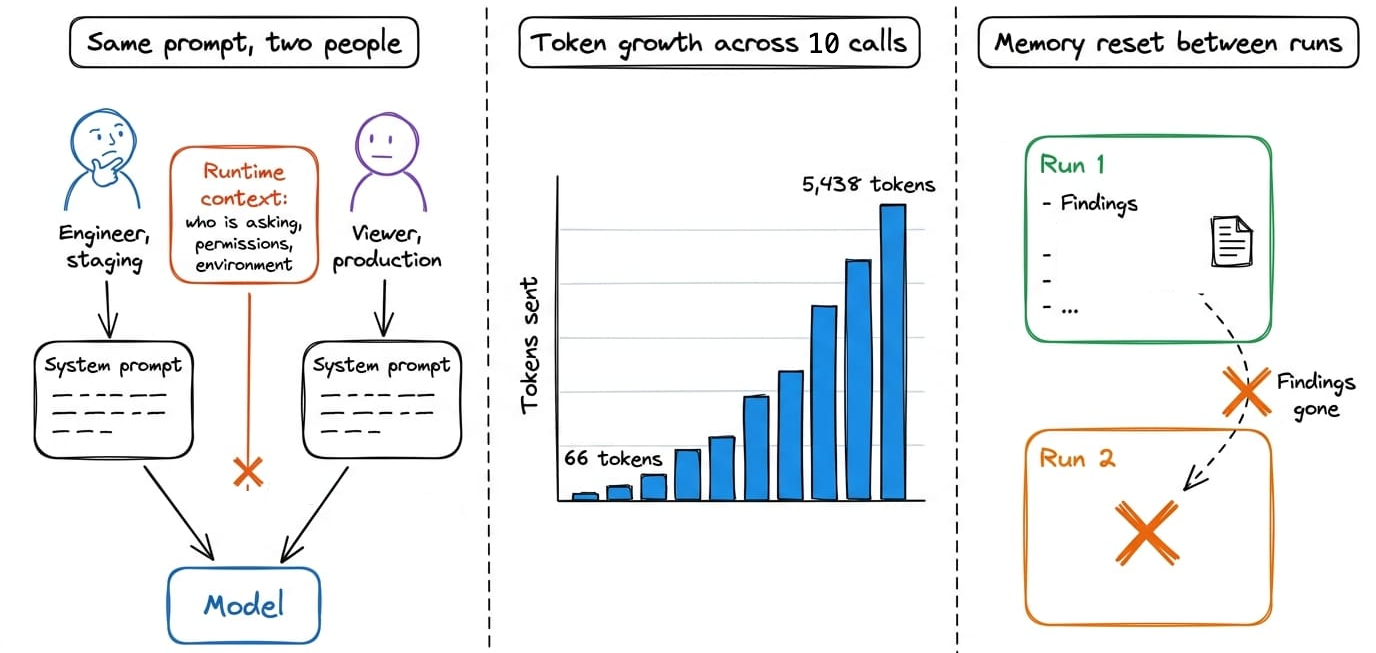
The code behaved as written. The missing piece was control over the model's context. LangChain's documentation frames agent failures in the same way: a model call takes the wrong action because either the model wasn't capable enough, or it received the wrong context.
This article (Part 2) adds that control:
- Each model call gets a prompt assembled for the current requester.
- Middleware trims stale context, offloads large results, and summarizes long conversations.
- The agent writes useful findings to a store, then retrieves them on later runs without crossing tenant boundaries.
Prerequisite: Part 1 of this series. You can read it below:
 Avi Chawla
Let's begin!
Context engineering
A model call has one input, the tokens it receives. Those tokens carry everything the model knows about the task, the user, the tools, and the work so far.
Context engineering decides what belongs in that input on each call.
Anthropic defines it as choosing and maintaining the best set of tokens during inference. That includes everything placed in the window beyond the prompt itself.
LangChain describes the job as giving the model the information and tools it needs, in a usable format.
Why agents make it hard
A single chat completion has a fixed input. An agent does not. Every tool call adds a request and a result. Every model turn adds a reply. Hence, the model's context is an accumulator.
Longer input does not produce uniform performance. Two studies show where it breaks down:
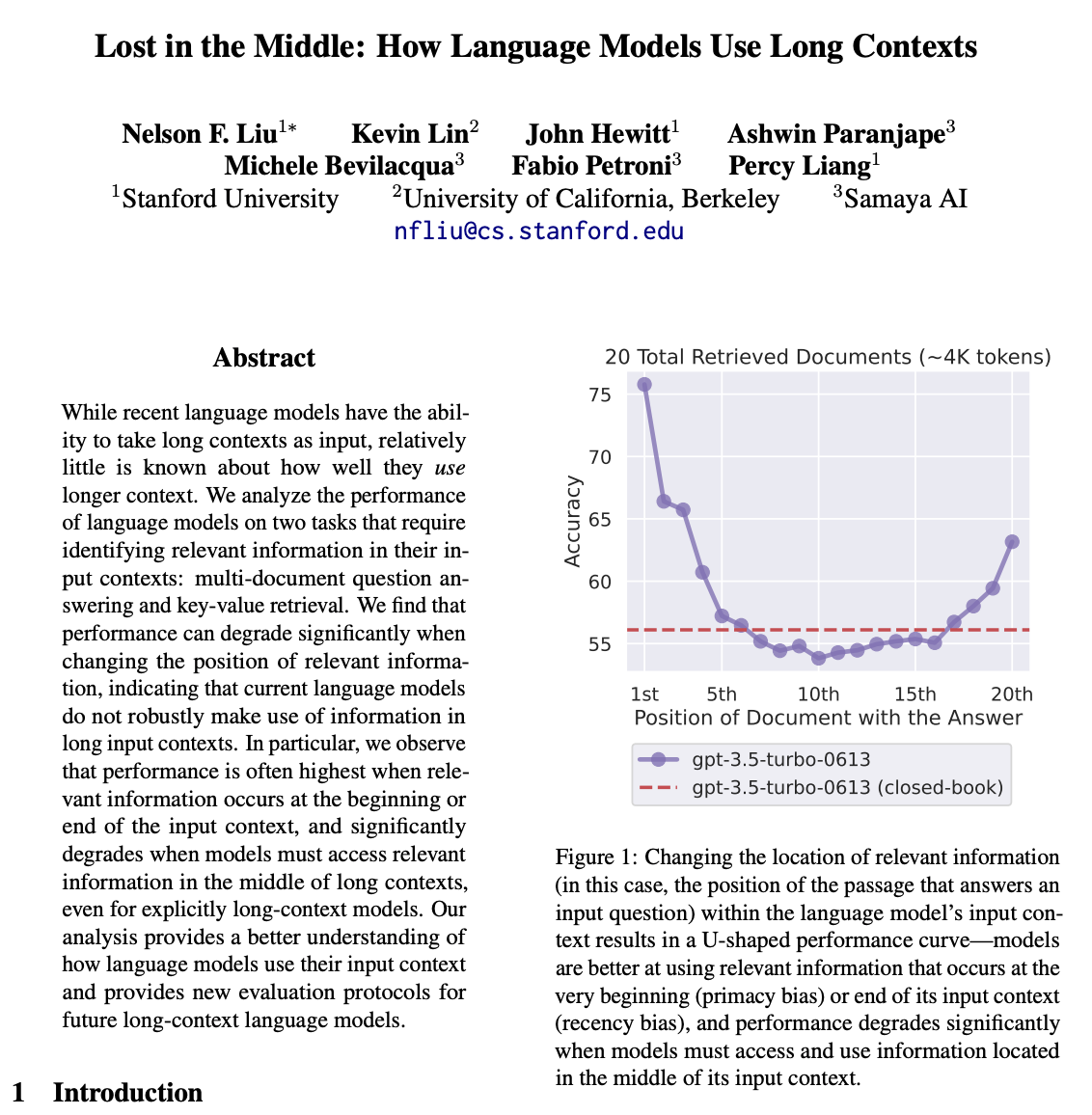
- In 2023, Liu et al. showed that model accuracy on retrieval and question answering depends on where the relevant information sits in the input. Accuracy is highest when it is near the start or the end. It drops when it is in the middle. The result is a U-shaped curve. Hence, position matters, not only presence.
- In July 2025, Chroma tested eighteen production models, including GPT-4.1, Claude 4, and Gemini 2.5. The tasks kept a fixed difficulty while only the input length grew. Every model degraded as the input got longer, even on simple retrieval and copying tasks. The degradation was worse when the relevant text did not obviously match the question, and distractors made it worse still.
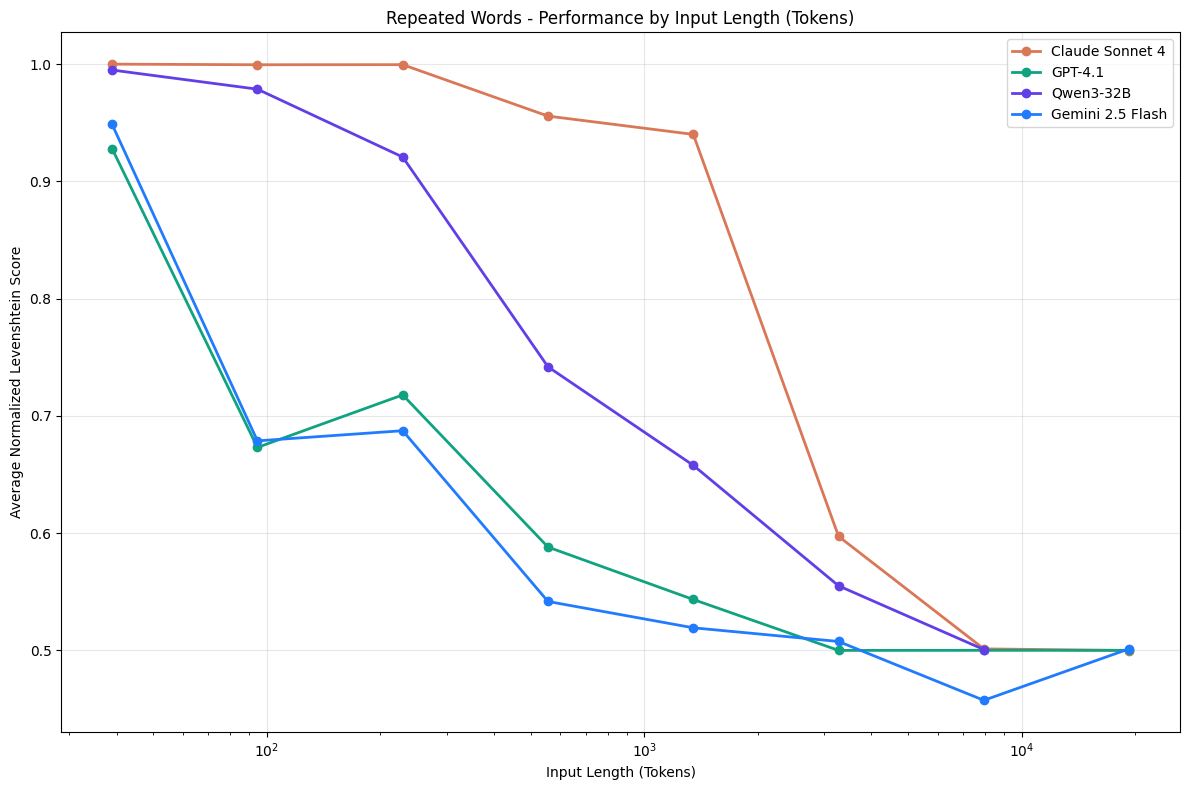
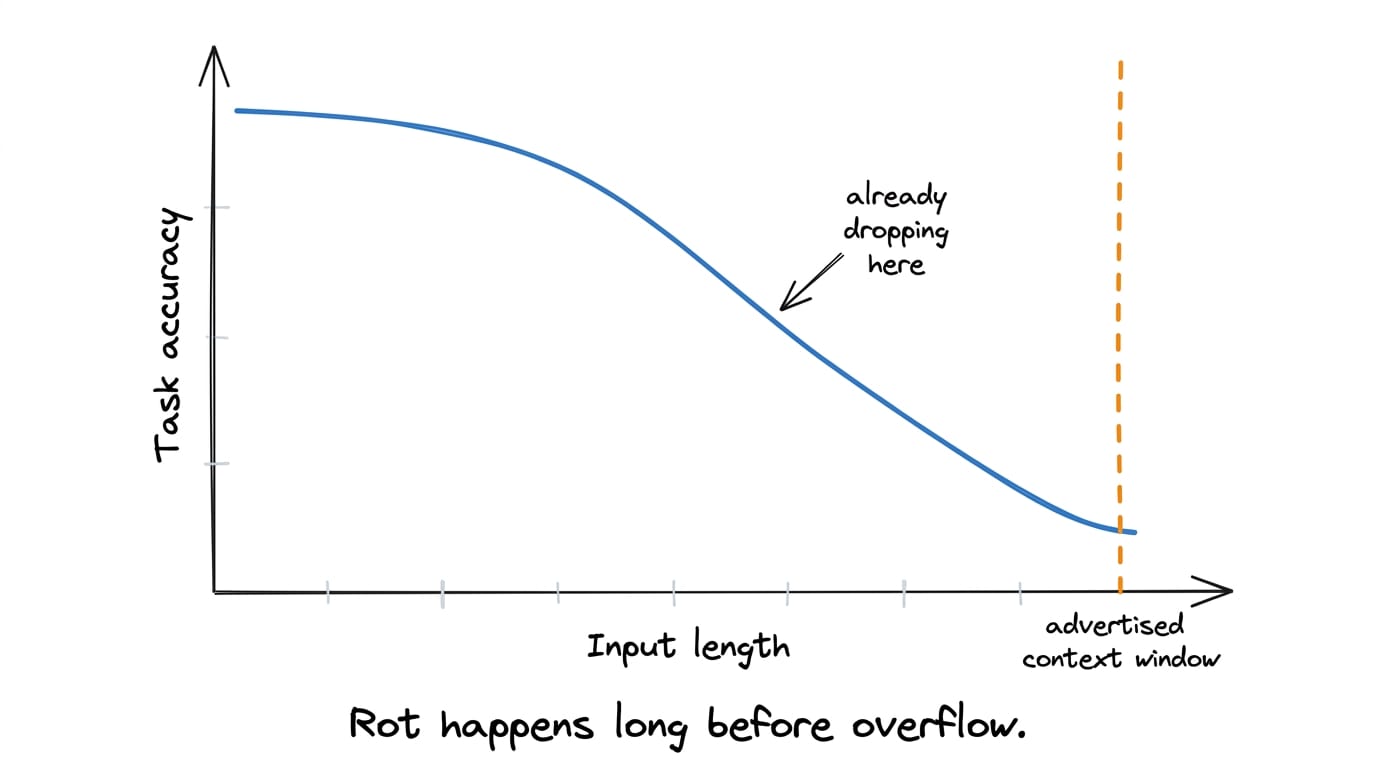
The phenomenon is known as context rot. Since attention is a finite budget, every token added competes for it, and the model's ability to recall any given fact declines as the total grows.
Hence, the practical rule is simple, find the smallest set of high-signal tokens that maximizes the chance of the outcome you want.
The four operations
In June 2025, Lance Martin in his blog organized the practices agents use into four useful operations:
- Write: Save information outside the context window so it is available later. Scratchpads during a task and memories across tasks.
- Select: Pull the right information into the window for a step. Retrieval, memory lookup, tool selection, etc.
- Compress: Keep only the tokens the task needs. Trimming, summarization and pruning of stale results helps.
- Isolate: Split context so that different parts do not interfere. Separate agents, separate state, quarantined inputs, etc.
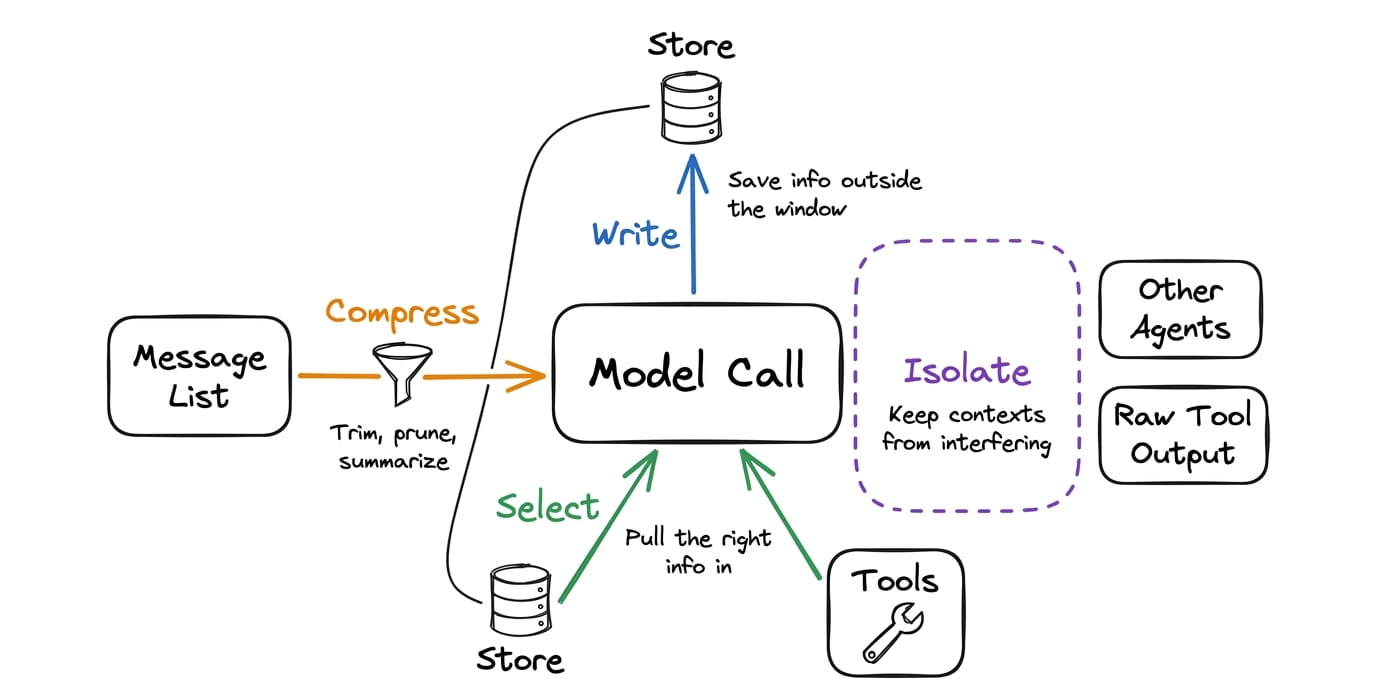
An agent loop keeps adding to the model's context, and model performance declines as that context grows. Write, select, compress, and isolate give us practical ways to control it.
Three kinds of context, three data sources
Before touching the agent, we need to separate what can be controlled from where the underlying data lives. The project follows LangChain's model for both.
What you can control
The docs divide context into three types, according to where in the agent loop it acts:
- Model context: What goes into each model call. Instructions, message history, tools, response format. It is transient.
- Tool context: What tools can read and write. State, store, runtime context. It's a persistent context type.
- Lifecycle context: What happens between model and tool calls. Summarization, guardrails, logging. This one is also persistent.
The transient versus persistent distinction decides most of the design in this part. For example:
- Trimming the message list for one call is a model-context operation. It should be transient. Nothing is lost; the full history is still in state.
- Summarizing old messages is a lifecycle operation. It is persistent by design. The originals are gone and the summary stands in for them.
Both are compression, but one is reversible and one is not.
Where the data comes from
The docs list three data sources the agent reads from and writes to:
| Data source | Also called | Scope | Examples |
|---|---|---|---|
| Runtime context | Static configuration | One run | User ID, tenant, role, API keys, database connections |
| State | Short-term memory | One conversation (thread) | Current messages, tool results, files uploaded this session |
| Store | Long-term memory | Across conversations | User preferences, extracted facts, past investigations |
Part 1 introduced runtime context and state. The store is new in this chapter.
The store
A store is a key-value database that outlives any single conversation.
LangGraph ships an interface for it and several implementations, from in-memory to Postgres.
Values are dictionaries. Keys are strings. Every key lives inside a namespace, which is a tuple of strings that works like a folder path.
("acme", "investigations") is invisible to a search under ("globex", "investigations").There is no global lookup that crosses namespaces by accident. The project uses this to guarantee isolation, and a test proves it.
The store supports put, get, search, and delete. Search takes a namespace prefix and returns items under it, optionally filtered.
With an embedding index configured, search also accepts a natural-language query and ranks by similarity. Without one, it is a filtered listing.
Where a piece of information belongs
The project uses the following defaults to decide where information belongs.
| Information | Home | Why |
|---|---|---|
| Who is asking, their role, the environment | Runtime context | Fixed for the run. Must not be model-editable. |
| Secrets, API keys, DB handles | Runtime context | Must never enter a prompt or a checkpoint. |
| The conversation so far | State | Grows during the run. Reducer appends. |
| A tool result | State | Part of the conversation. Can be compressed later. |
| A note the agent makes for itself mid-task | State | Scratchpad. Scoped to this thread. |
| What was learned, for next time | Store | Must survive the thread. Namespaced by tenant. |
| A large output the model should not re-read | Store | Persist the full thing, keep a handle in state. |
The scratchpad row is the "write" operation inside a run. A planner that produces a checklist should put it in a state field instead of a chat message, so later nodes can read it as data. We'll be exploring more about this in a later part.
The final row refers to handling tool results that are too large for the conversation. The full output goes to the store, while state keeps a short stub and lookup key.
So overall, model context is transient; tool and lifecycle context persist. Runtime context, state, and the store each have a different scope. Keeping those boundaries explicit prevents accidental persistence and gives tenant namespaces a clear place to enforce isolation.
Note on reference project:
The code and project setup are attached below as a zip file. You can extract it and run uv sync to get going.
Download the zip file below: