A Practical Deep Dive Into Memory Optimization for Agentic Systems (Part B)
AI Agents Crash Course—Part 16 (with implementation).
Recap
In Part 15, we deliberately started from the ground up discussing how large language models are inherently stateless.
The model does not remember what happened earlier unless you show it again in the prompt. All of the memory we see in real systems is a product of managing context outside the model.

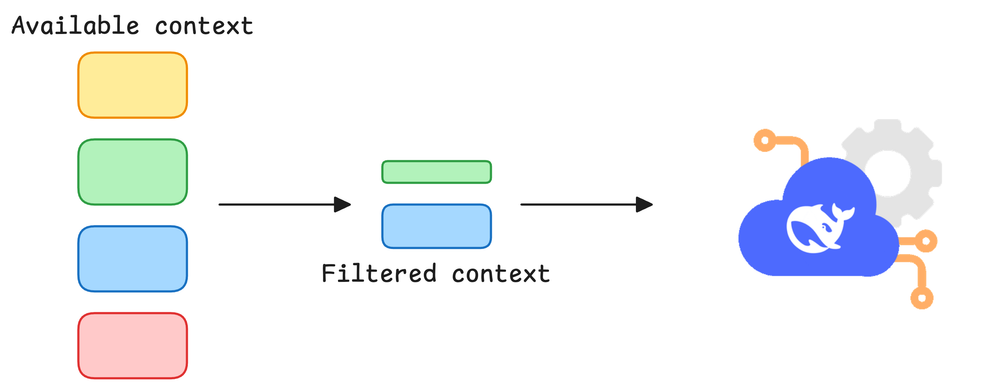
To make that concrete, we built a truly stateless agent in LangGraph that accepts user input and outputs a response. Each call built a fresh prompt from scratch using only the current input, sent it to the LLM, and returned a one-off answer.
The moment we asked a follow-up question, the agent had no idea about the previous query or its own response. Every request was independent. There was no conversation history and no concept of memory at all.
From there, we layered in the LangGraph mental model that we used throughout the article:
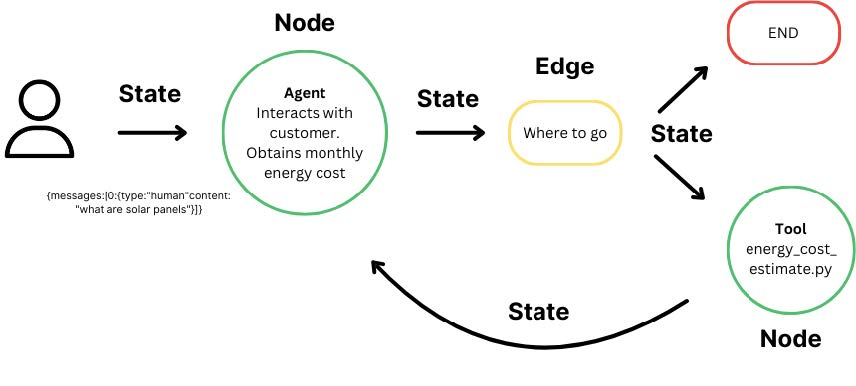
- State as the single object that flows through the graph, updated at each step.
- Nodes as small, focused functions that read from state and return updates.
- Edges as the control flow that decides which node runs next.
- Conditional edges for loops and branches.
Once that was clear, we introduced the memory side of the LangGraph ecosystem.
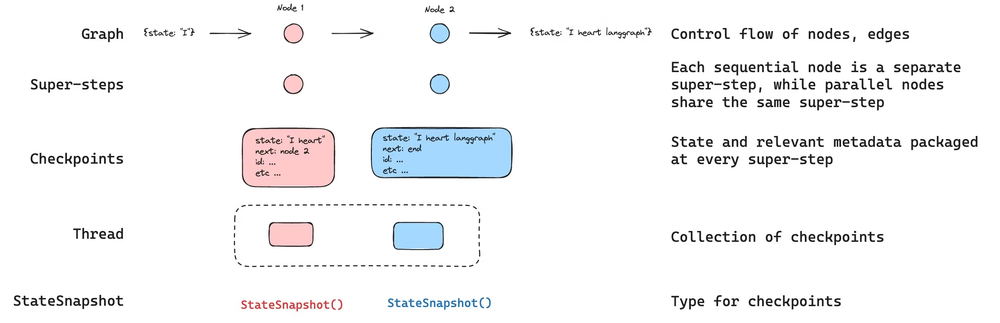
On the short-term side, we moved from a simple state to a MessagesState that holds a growing list of messages storing the conversation history. We wired this into a node and compiled the graph with a checkpointer plus a thread ID.
LangGraph then started persisting the conversation for that thread as a series of checkpoints, so that each turn could see the full interaction so far without us manually passing the history around.
On the long-term side, we looked at the store abstraction in LangGraph for durable memory. Instead of keeping everything inside a single thread, we wrote JSON documents into a store and then retrieved them on future runs.
This gave us cross-session memory for things like user preferences, project metadata, and past decisions. We also saw how threads, checkpoints, and stores were all tied together through the config layer.
By the end of Part 15, we had not optimized anything. But we did answer a more fundamental question, "Where does memory actually live in a LangGraph-based system, and how does it behave over time?"
If you haven’t explored Part 15 yet, we strongly recommend going through it first, since it sets the foundations and flow for what's about to come.
Read it here:
 Avi Chawla
In this chapter, we’ll understand and learn about memory optimization in agentic workflows, with necessary theoretical details and hands-on examples.
As always, every notion will be explained through clear examples and walkthroughs to develop a solid understanding.
Let’s begin!
Introduction
To quickly reiterate, Part 15 was about understanding the LangGraph ecosystem, how it represents workflows as graphs over a shared state, and how threads, checkpoints, and stores combine to give you short-term and long-term memory layers.
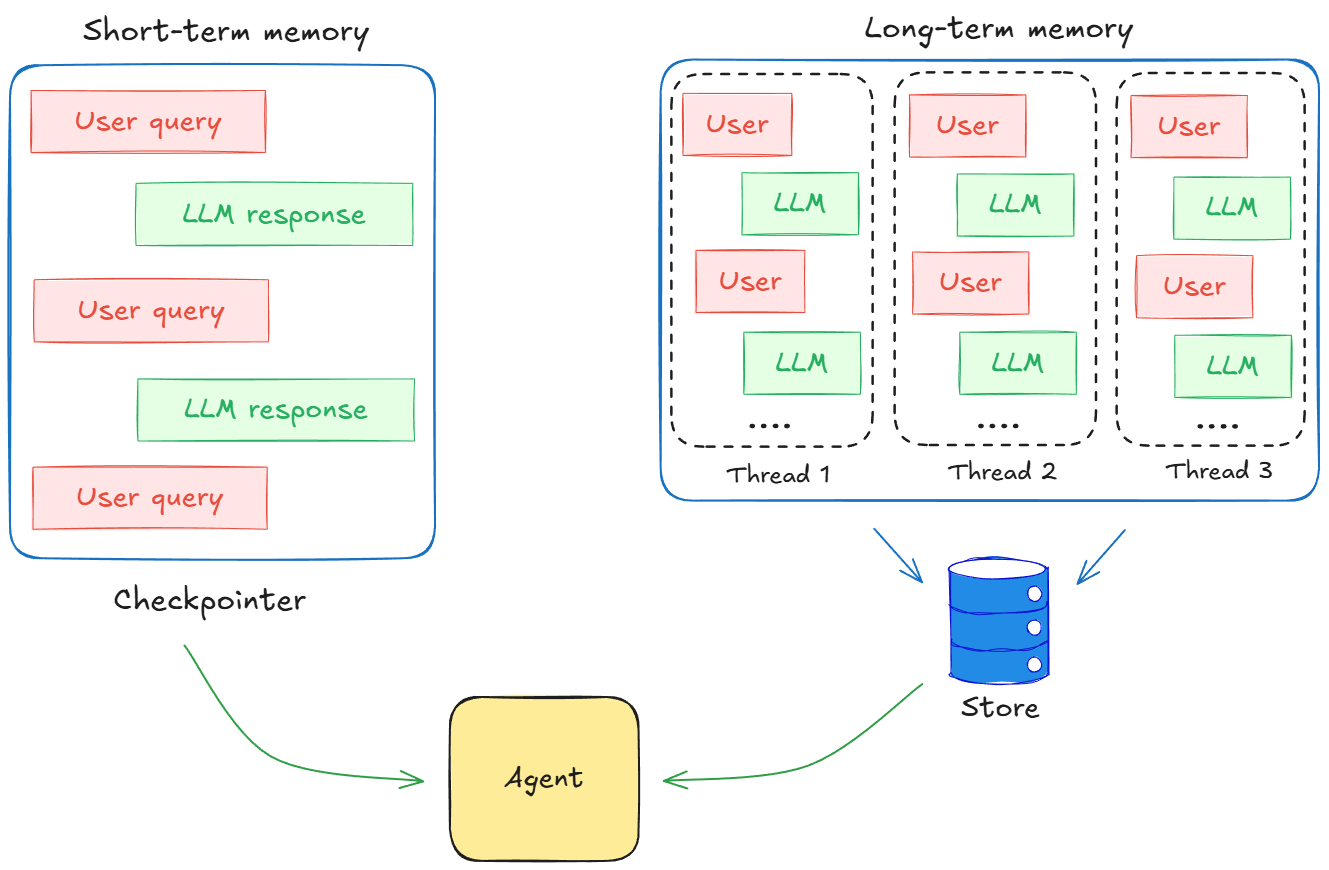
This and the upcoming part (Parts 16 and 17) are about taking that foundation and putting it to use in understanding memory optimization strategies in depth. Here we start using that understanding to build agents that are not just stateful, but efficient and production-ready.
Once we move beyond demo scripts and into production, stuffing everything into the context window stops working almost immediately. Token limits are real. Costs grow fast. High latency means slow responses and poor user experience.
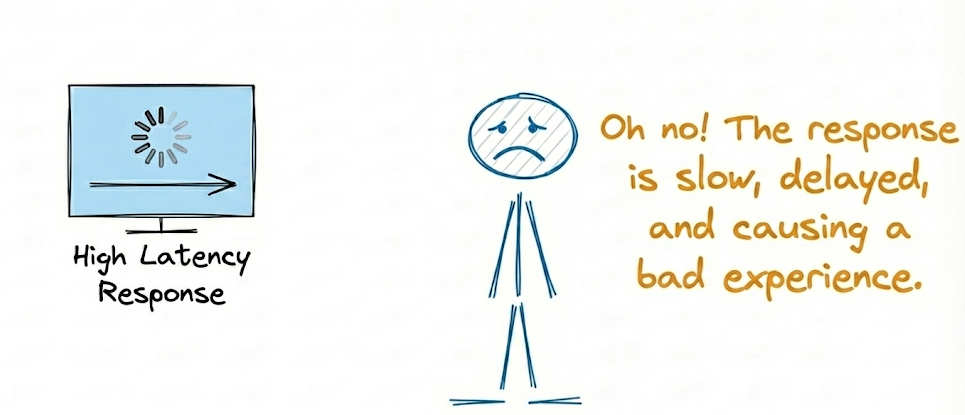
Therefore, it is quite clear that throwing more tokens at the model does not automatically give us better behavior.
So the question is not “How do I give the model more memory?” The question is “How do I give the model the right memory at the right time, for optimum performance?”
That is what memory optimization is about.
In this chapter, we will treat memory as a first-class design problem and walk through a set of practical strategies to manage it in LangGraph. For each strategy, we will focus on three things:
- Intuition: What problem it solves, where it fits in the stack, and what it trades off.
- Implementation: How to express it using LangGraph’s building blocks: state, nodes, edges, threads, checkpoints, and stores.
- Behavior: How it changes cost, latency, and the quality of responses in realistic flows.
We will keep everything grounded and run a single example of a customer support chatbot for a SaaS product.
This agent will need to:
- Handle long, messy support threads with follow-ups and clarifications
- Refer back to earlier messages in the same ticket without re-asking everything
- Remember user-level information across tickets (plans, preferences, past issues)
- Stay within reasonable latencies
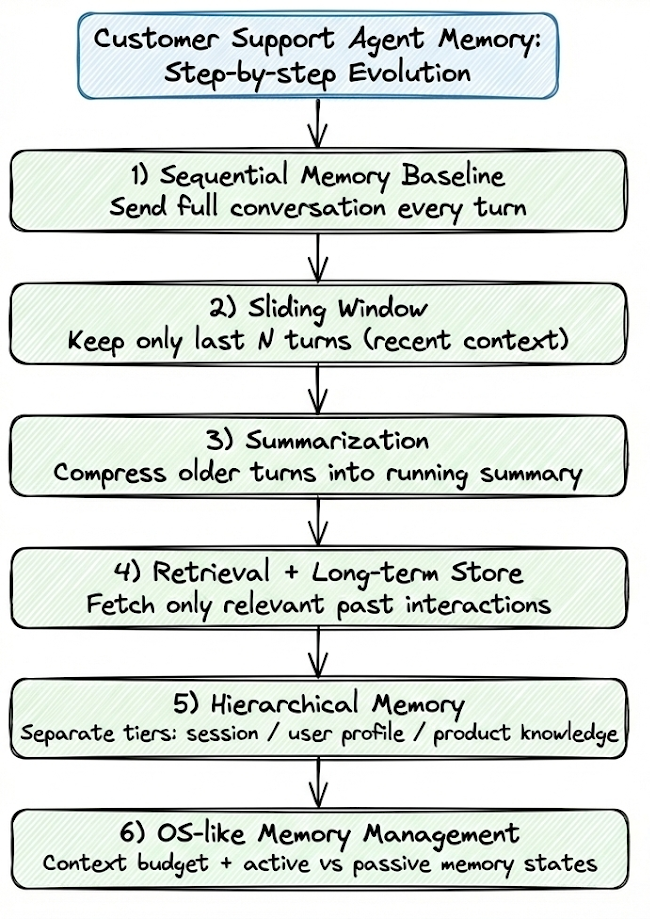
We will be looking at an example of a customer support agent and evolve our agentic system step by step:
- Start with a sequential memory baseline where we send the entire conversation to the LLM on every turn.
- Introduce sliding windows to bound how much recent context we carry into each call.
- Add summarization so that older parts of the conversation are compressed rather than dropped.
- Layer in retrieval over a long-term store so we can pull back only the most relevant past interactions.
- Move to hierarchical memory where session-level context, user profiles, and product knowledge live in clearly separate tiers.
- Add OS-like memory management, where we treat context as a limited budget and explicitly choose what stays in active vs passive memory states.
All of this will be implemented in LangGraph with code you can adapt and reuse for developing your own agents.
To summarize our system evolution as a diagram:
To provide you an in depth understanding of the concepts, we would build these memory frameworks using only the fundamental components of LangGraph discussed previously.
The same strategies could also be implemented using more abstract components but we won't use them for this tutorial.
By the end of this and the next part, you should be able to look at your own agent and choose the right memory strategy based on the decision frameworks we will discuss.
Sequential memory
In Part 15, we ended with a simple but powerful idea wherein we store all messages inside a list and persist that state with a checkpointer and a unique thread ID. This effectively gives us an agent with short-term memory inside a conversation.
That exact sequential pattern is the first technique we shall discuss.
In the baseline agent with no memory, the state consisted of just the user query and the LLM response, and every call built a prompt from scratch with only the current input. As a result, the agent could not recall any prior information when answering the next user query.
In the sequential approach, the state holds a growing list of messages, and we always send the full conversation history to the model on each turn. This creates a linear chain of memory, preserving everything that has been said so far.
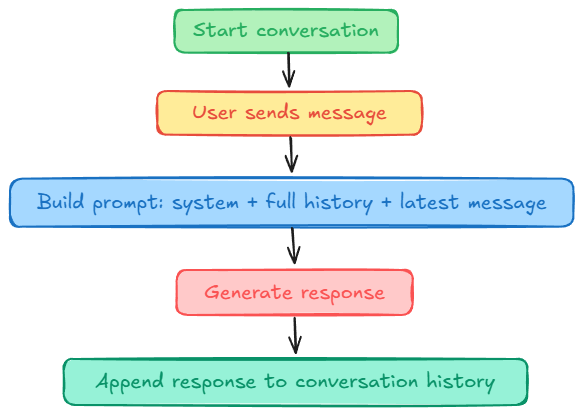
This gives us an agent that can handle follow-ups correctly.
This strategy is the simplest of all and will serve as a reference implementation to compare all other memory strategies against.
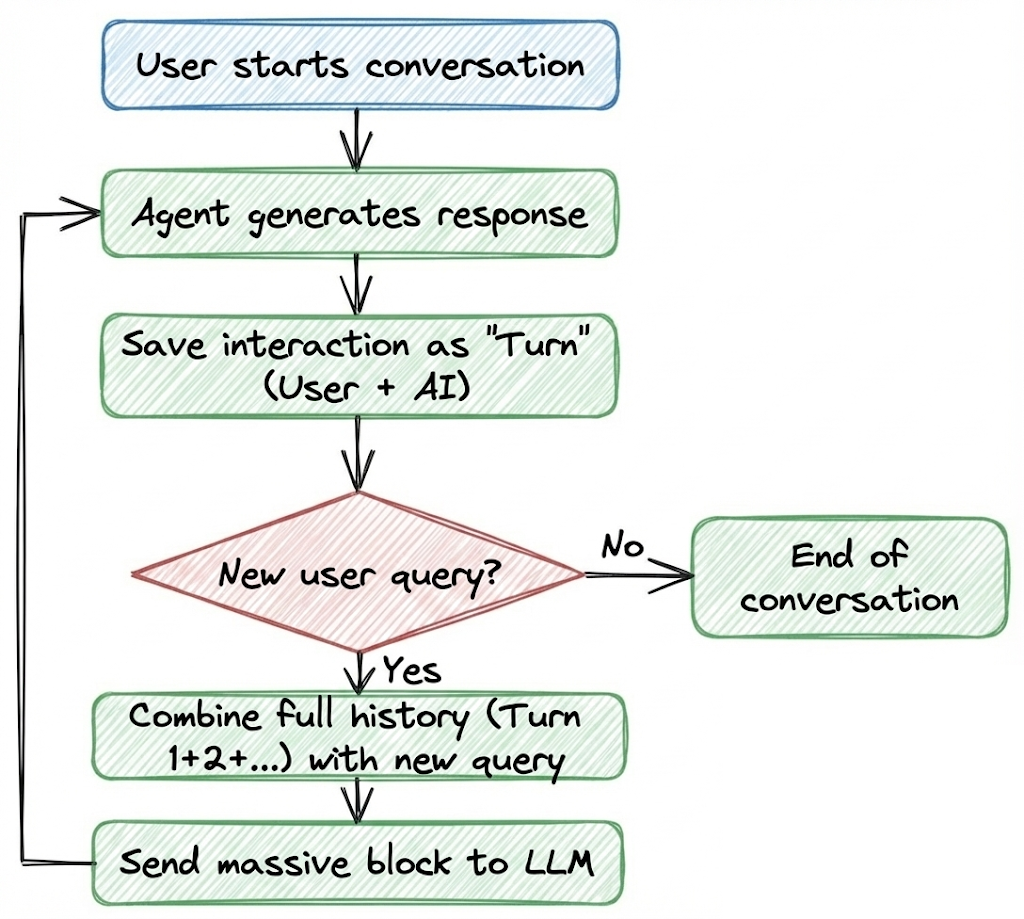
Before we dive into the code, let’s build an intuition for how this works in plain terms:
- The user starts a conversation with the AI agent.
- The agent generates a response.
- This user-AI interaction is saved as a single block of text. Let's call it a turn.
- For each subsequent turn, the agent takes the entire conversation history (Turn 1 + Turn 2 + Turn 3, and so on) and combines it with the new user query.
- This massive block of text is sent to the LLM to generate the next response.
Here's a diagram, summarizing the flow:
Implementation
Now, let's look at how we can implement this in LangGraph.
Before moving on, let's first complete our setup and install the required dependencies.
We will use OpenRouter as our main LLM provider for this tutorial. It provides a single API to connect to all the LLM providers out there.
Go to OpenRouter, create an account and get your API key, and store it in a .env file:
Next, we load this key into our environment as follows:
OpenRouter is compatible with the OpenAI chat completions API, so we can use ChatOpenAI with a custom base_url to define our LLM.
model is the model identifier from OpenRouter. You can swap this out for Claude, Gemini, or any other open source model if you like.
Now we are all set to get on with the code.
Let's first define our state as follows:
Here:
messageswill hold the entire conversation history: user messages, AI replies, tool calls, tool results.operator.addtells LangGraph to append new messages instead of overwriting the list.
This is exactly what we need for the conversation to grow over time and gives us short-term memory within a single thread.
Next, we set up our LLM node for response generation:
Here:
- The node reads
state["messages"], prepends a system message, and sends the entire history to the LLM. - LLM returns a single new message, which will be appended to the conversation list due to
operator.add.
Now we compile the graph and enable checkpointing to persist state between calls:
Here we are creating a simple graph:
- It has a single node,
chat_llm, which handles one turn of conversation. - The graph starts at
START, runschat_llm, and then reachesEND. - We compile it with an
InMemorySavercheckpoint. This is what allows LangGraph to save and restore the conversation state across multiple calls.
Sample conversation
We now have a full-history, sequential memory agent in LangGraph.
But what good is our agent if it can't answer user queries reliably. So, now let's test by simulating a simple support ticket flow for our customer support agent.
To quantify the impact of this strategy and to easily compare different memory strategies later, we will analyze their token usage and latency as we go along the conversation.
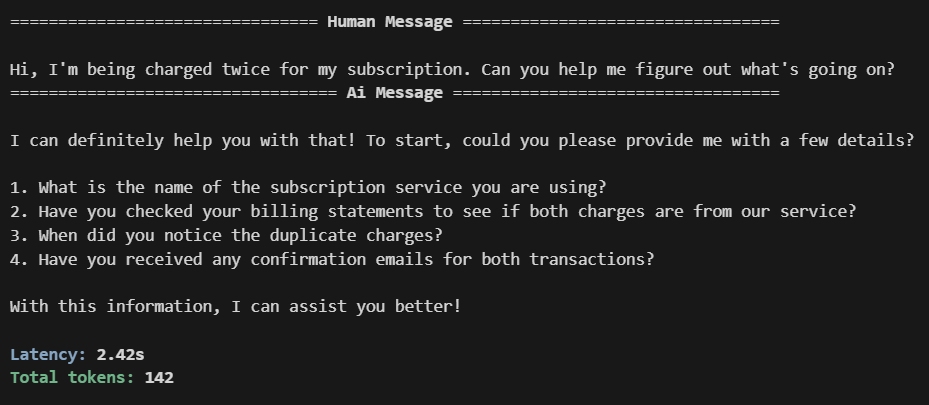
Turn 1:
For this turn:
messagescontains oneHumanMessagedescribing the issue.chat_llm_nodereturns an answer.- Checkpointer saves a checkpoint for
thread_id="ticket-seq"containing both the user message and the assistant's reply.
Turn 2: